
Download TS-Doctor – TS file repair, video editing tool, HDTV recording, subtitle conversion, metadata analysis, DVB subtitles, error checker, Windows software
Overview
TS-Doctor is a specialized Windows application designed for users who regularly handle Transport Stream (TS) files—commonly generated during HDTV recordings and live streaming sessions. The software addresses the challenges associated with editing, repairing, and converting TS files, which are often incompatible with mainstream video editing tools. By offering robust functionality tailored to this niche, TS-Doctor streamlines workflows for content creators, archivists, and digital media professionals who rely on high-fidelity video preservation and precise editing.
Its primary purpose is to enhance the usability of TS files by enabling metadata analysis, error detection, and subtitle format conversion. These capabilities make it particularly valuable for users who need to extract clean, ad-free recordings for reuse in projects. The application supports tasks such as content segmentation, subtitle extraction, and integrity verification, all critical in maintaining the quality and structure of recorded broadcasts.
Target users include video editors, home media enthusiasts, and digital archivists working with broadcast-quality recordings. While the developer is listed as TS-Doctor, no additional background information is available. The app’s role in the productivity ecosystem lies in bridging the gap between raw broadcast data and editable video content, offering a reliable utility for post-production refinement.
Key Features & Functionality
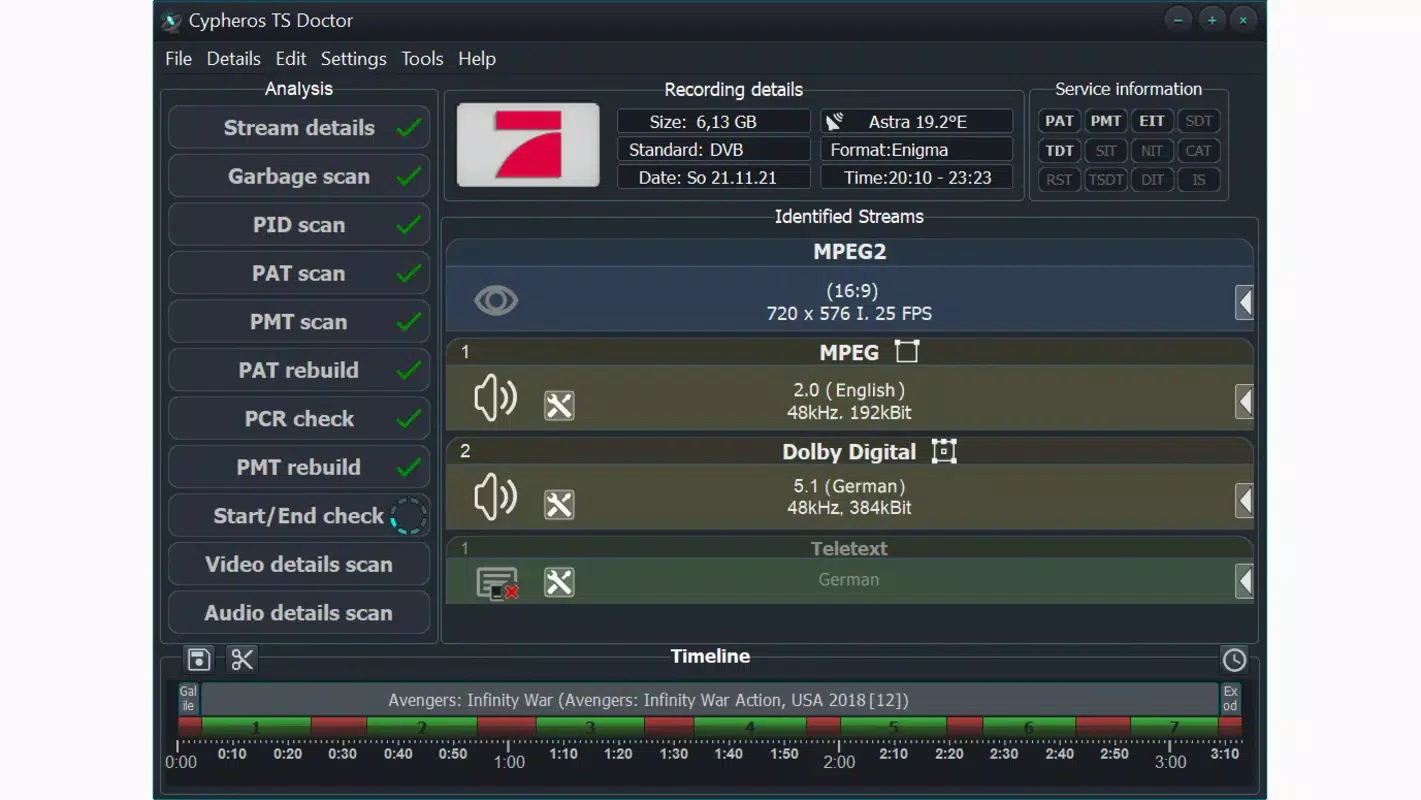
- Intelligent Content Detection: TS-Doctor uses advanced algorithms to analyze the structure and content of TS files. It identifies natural breakpoints in recordings, such as program transitions or commercial segments, enabling users to split files into logical sections. This feature is especially useful for removing ads from TV programs, allowing for cleaner, more professional edits.
- Subtitle Format Conversion: The software converts DVB subtitles embedded in TS files into widely supported formats like SRT. This ensures compatibility with most video editing platforms and streaming services, enhancing accessibility and workflow integration.
- Comprehensive Error Check: TS-Doctor performs deep packet-level analysis to detect errors such as missing headers, corrupted data, or broken continuity. Users can review error logs directly within the interface and apply automated fixes to restore file integrity.
- User-Friendly Interface: The application features a clean, intuitive layout that simplifies navigation across its core tools. Even users without technical expertise can access powerful functions without extensive training, reducing the learning curve.
- Free Trial Availability: A trial version is offered, allowing users to test core functionalities before purchasing. While the trial has limitations, it provides a realistic preview of the software’s capabilities and performance.
For example, a content creator archiving a live sports broadcast can use TS-Doctor to remove commercial breaks, convert subtitles for subtitles-in-video integration, and verify file integrity before editing. This real-world use case demonstrates how the app enhances efficiency and output quality.
Interface, UX & Performance
TS-Doctor presents a straightforward and organized interface, with tools logically grouped and accessible via clearly labeled menus. The visual design prioritizes functionality over ornamentation, minimizing distractions and allowing users to focus on their workflow. Navigation is consistent across all features, with minimal steps required to initiate tasks like file loading, analysis, or conversion.
Although the developer did not list formal performance metrics, the application is designed to operate efficiently on standard Windows systems. It processes TS files of varying lengths without significant lag, suggesting optimized handling of large video data. Responsiveness is maintained during analysis and conversion tasks, with progress indicators providing feedback on ongoing operations.
Stability appears to be a focus, as the software handles complex file structures without crashing. However, specific requirements for RAM, CPU, or disk space were not disclosed. The app runs on Windows, and no compatibility issues were reported in the release notes. Users can expect reliable operation across different device categories, provided the system meets baseline OS requirements.
Platform Compatibility & Technical Requirements
TS-Doctor is designed exclusively for the Windows operating system. The current version is 2.3.0, with a file size of 15.2 MB. This compact footprint suggests a lightweight application that does not require extensive system resources for installation or execution.
The developer did not specify minimum OS requirements, nor did they list supported Windows versions. Compatibility information was not fully disclosed. Users should ensure their system meets standard Windows 10 or 11 requirements for optimal performance. No additional dependencies or third-party libraries were mentioned in the release notes.
Pros and Cons
- Specialized tool for handling TS files used in HDTV recordings
- Efficient subtitle conversion from DVB to SRT format
- Intelligent content detection for ad removal and file segmentation
- Comprehensive error-checking at the packet level
- Free trial available for risk-free evaluation
- Intuitive interface suitable for both beginners and experienced users
- No public information on developer background or company history
- Specific system requirements not listed
- Not available for macOS or Linux platforms
- Price point may be high for casual users
- Only supports Windows-based systems
FAQ
Is TS-Doctor compatible with all types of TS files?
TS-Doctor is designed to handle standard Transport Stream files commonly used in HDTV recordings and live broadcasts. While it supports a wide range of TS structures, compatibility may vary depending on file encoding and metadata complexity.
Can I use TS-Doctor on macOS or Linux?
As of now, TS-Doctor is only available for Windows. There is no official version for macOS or Linux platforms.
Does TS-Doctor require an internet connection?
TS-Doctor operates offline once installed. No continuous internet connection is required for core functionality. However, the trial version may require online validation.
How do I update TS-Doctor to the latest version?
Updates are typically distributed through the official website. Users should visit the developer’s site to download the latest version when available.
Is the trial version fully functional?
The trial version provides access to core features but includes limitations. It allows users to test functionality without full export or conversion capabilities, helping evaluate suitability before purchase.
Final Thoughts
TS-Doctor stands out as a focused, high-value utility for professionals and enthusiasts working with HDTV recordings. Its ability to repair, analyze, and convert TS files makes it an essential tool in the video editing pipeline. The intelligent content detection and subtitle conversion features significantly reduce manual effort, while the error-checking functionality ensures file integrity.
While the app is limited to Windows and lacks detailed technical specifications, its clear purpose and effective execution justify its price point for targeted users. Content creators, archivists, and media editors who frequently work with broadcast streams will find it indispensable.
Download TS-Doctor now


